
Google Search Console API Tutorial: How We Built a Dealer SEO Dashboard
How DriveWide connected the Search Console API to its Intelligence Hub with OAuth, daily imports, URL Inspection and AI-assisted analysis.
Search Console API vs. the "Google Search API"#
Many developers searching for "Google Search API" are looking for a way to get Google search results as JSON. That is a different product. The Custom Search JSON API is closed to new customers, and existing customers have until January 1, 2027 to move to an alternative (Google for Developers).
The Search Console API doesn't return search results. It returns your own site's performance in Google Search: queries, pages, clicks, impressions, CTR, average position, and index status for URLs you own. If your goal is measuring and improving your website's organic traffic, the Search Console API is the right tool.
Scroll to see full table
| Search Console API | Custom Search JSON API | |
|---|---|---|
| Returns | Your site's search performance and index status | Google search results for a query |
| Auth | OAuth with property access | API key + search engine ID |
| Availability | Available | Closed to new customers; ends Jan 1, 2027 |
A dealership website produces useful information every day. Shoppers search for vehicles, compare financing options, and look for nearby dealerships. Some discover the business for the first time. Others already know its name. The challenge is turning those signals into decisions.
At DriveWide in Daytona Beach, I wanted that information available inside the tools we already use to run the dealership. We connected Google Search Console to the DriveWide Intelligence Hub, our business dashboard and growing AI toolset.
We used AI-assisted development to help build the integration, reporting tools, and tests. The SEO recommendations currently displayed in the platform follow defined rules based on imported evidence. That gives us a measurable foundation for adding more advanced AI analysis.
This is a development guide for other dealers: what we connected, what we learned, and how we use the information to choose useful SEO work.
1. Start with the dealership’s questions#
Before connecting an API, decide what the information should help you do. We wanted to know which searches bring shoppers to DriveWide, which pages receive visibility without enough clicks, and whether we reach people who have not already searched for our name.
A website-wide traffic number cannot explain whether an inventory category is gaining visibility or a financing page’s position is improving. We built around four measurements: clicks, impressions, click-through rate, and average position. CTR is clicks divided by impressions. Average position is weighted by impressions; it is not a fixed ranking every shopper sees.
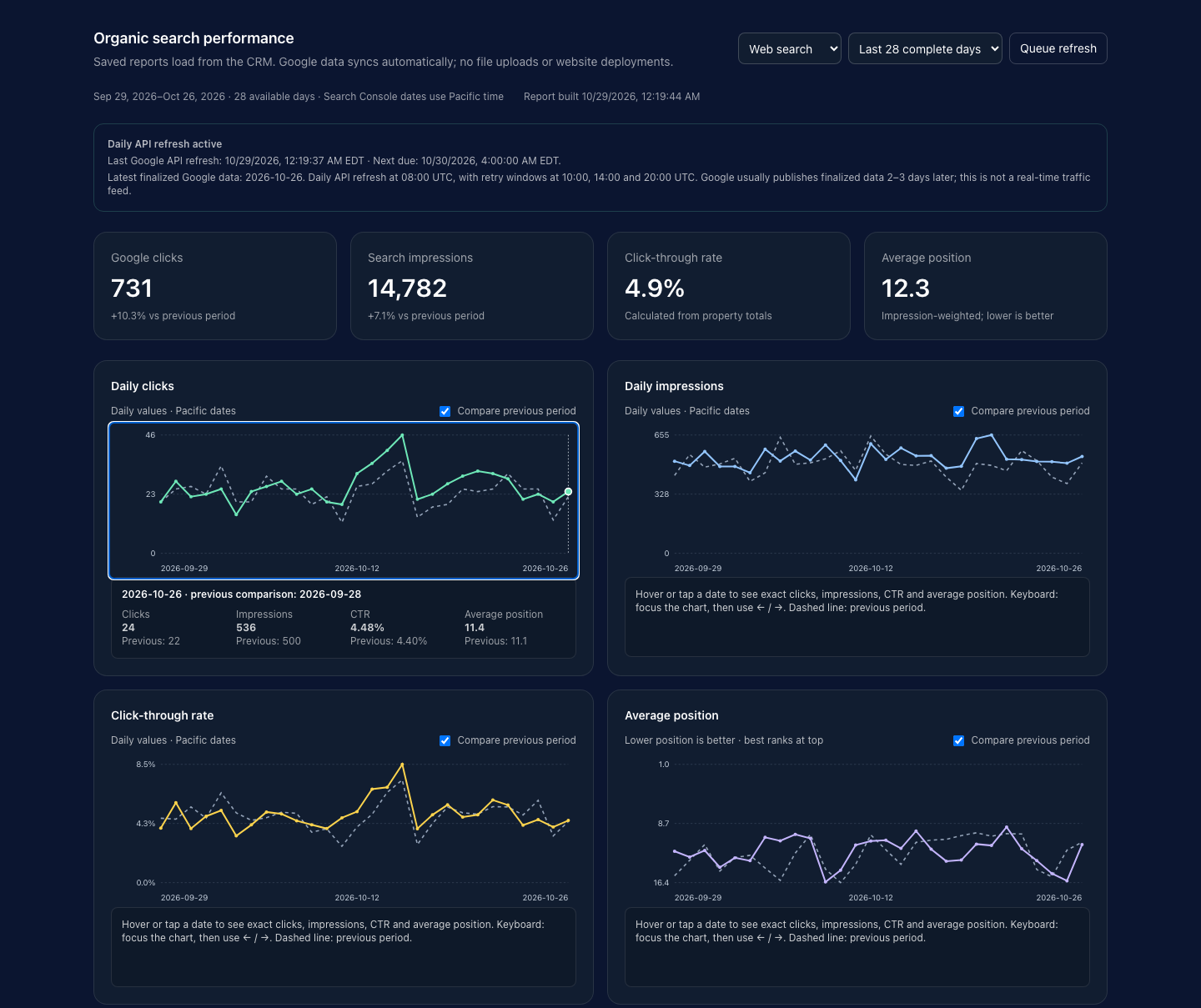
Scroll to see full table
| Metric (Sep 29–Oct 26, 2026) | Value |
|---|---|
| Clicks | 731 |
| Impressions | 14,782 |
| "drivewide" query clicks | 129 (vs. 106 prior period) |
| BHPH Daytona page | 5,142 impressions, 108 clicks, 2.10% CTR, avg. position 6.3 |
2. Connect the right Google account and property#
The dealership’s website must first be available in Google Search Console. The Google account authorizing the application needs access to that property. We connected the domain property covering drivewide.com.
This deserves attention when several vendors have managed a dealership’s website. The account used to sign into a business dashboard can differ from the one that controls Search Console. Enabling an API in Google Cloud and granting access to the website’s data are separate requirements.
3. Enable the API and configure secure authorization#
We enabled the Search Console API in a Google Cloud project, configured the OAuth consent screen, and created a web application client. Private reporting requires OAuth authorization from an account with property access. An ordinary API key is not enough.
We requested the read-only scope https://www.googleapis.com/auth/webmasters.readonly. The application’s exact callback URL must be registered in Google Cloud. If Google displays redirect_uri_mismatch, check the protocol, hostname, and callback path against the registered redirect URI.
Our server exchanges the authorization code, validates the callback state, and saves the refresh token in encrypted storage. It uses that token to obtain short-lived access tokens. Credentials stay on the server, and connection changes require owner access. Continuing authorization still needs monitoring: permissions can be revoked, and the application must explain when reconnection is necessary.
// npm i googleapis
import { google } from "googleapis";

const oauth2 = new google.auth.OAuth2(
  process.env.GSC_CLIENT_ID,
  process.env.GSC_CLIENT_SECRET,
  process.env.GSC_REDIRECT_URI // must exactly match the URI registered in Google Cloud
);

// 1) Send the user to Google's consent screen
export function getAuthUrl(state) {
  return oauth2.generateAuthUrl({
    access_type: "offline",   // returns a refresh token
    prompt: "consent",
    scope: ["https://www.googleapis.com/auth/webmasters.readonly"],
    state,                    // validate this on the callback
  });
}

// 2) On the callback, exchange the code and store the refresh token encrypted
export async function handleCallback(code) {
  const { tokens } = await oauth2.getToken(code);
  // save tokens.refresh_token to encrypted storage, server-side only
  return tokens;
}
4. Import history and preserve measurement quality#
Historical data gives a new dashboard something meaningful to compare. We imported the available history into daily snapshots: property totals, search queries, landing pages, query-to-page relationships, devices, countries, and other available breakdowns.
The importer works in resumable batches. Refreshes replace daily snapshots instead of appending duplicates. Pagination and coverage reporting matter: Google documents up to 25,000 rows per response and a maximum of 50,000 rows per day, per search type. Google also withholds some query information, so a successful import cannot reveal every underlying search.
Our headline metrics come from property totals. We keep detailed query and page rows separate because they may not reconcile to the overall totals. We calculate CTR from total clicks and impressions and weight average position by impressions, rather than averaging daily percentages as if each day had equal volume.
const auth = new google.auth.OAuth2(process.env.GSC_CLIENT_ID, process.env.GSC_CLIENT_SECRET);
auth.setCredentials({ refresh_token: process.env.GSC_REFRESH_TOKEN });
const sc = google.searchconsole({ version: "v1", auth });

async function fetchAllRows(siteUrl, startDate, endDate, dimensions) {
  const rows = [];
  let startRow = 0;
  const rowLimit = 25000; // max rows per request
  while (true) {
    const res = await sc.searchanalytics.query({
      siteUrl, // "sc-domain:example.com" for a domain property
      requestBody: { startDate, endDate, dimensions, rowLimit, startRow, type: "web" },
    });
    const batch = res.data.rows ?? [];
    rows.push(...batch);
    if (batch.length < rowLimit) break;
    startRow += rowLimit;
  }
  return rows;
}

const rows = await fetchAllRows("sc-domain:drivewide.com", "2026-09-29", "2026-10-26", ["date", "query", "page"]);# pip install google-api-python-client google-auth
import os
from google.oauth2.credentials import Credentials
from googleapiclient.discovery import build
creds = Credentials(
None,
refresh_token=os.environ["GSC_REFRESH_TOKEN"],
token_uri="https://oauth2.googleapis.com/token",
client_id=os.environ["GSC_CLIENT_ID"],
client_secret=os.environ["GSC_CLIENT_SECRET"],
scopes=["https://www.googleapis.com/auth/webmasters.readonly"],
)
service = build("searchconsole", "v1", credentials=creds)
def fetch_all_rows(site_url, start_date, end_date, dimensions):
rows, start_row, row_limit = [], 0, 25000
while True:
body = {"startDate": start_date, "endDate": end_date,
"dimensions": dimensions, "rowLimit": row_limit,
"startRow": start_row, "type": "web"}
batch = service.searchanalytics().query(siteUrl=site_url, body=body).execute().get("rows", [])
rows.extend(batch)
if len(batch) < row_limit:
break
start_row += row_limit
return rowsEach row returns keys (in dimension order), clicks, impressions, ctr and position.
5. Refresh daily and serve saved reports#
Frequent worker runs helped finish the historical backfill and retry interruptions. Once that was complete, we reduced the schedule to one primary daily refresh and three later retry windows: four scheduled invocations per day instead of 96. Recent days are rechecked for revisions.
The dashboard reads saved reports from our database. Opening a chart or inspecting a term does not require another Google API request. We display the last API refresh, next scheduled refresh, and latest finalized performance date separately. Google’s finalized data typically arrives two to three days later, so a successful refresh can still show an earlier performance date.
6. Make individual terms and pages easy to investigate#
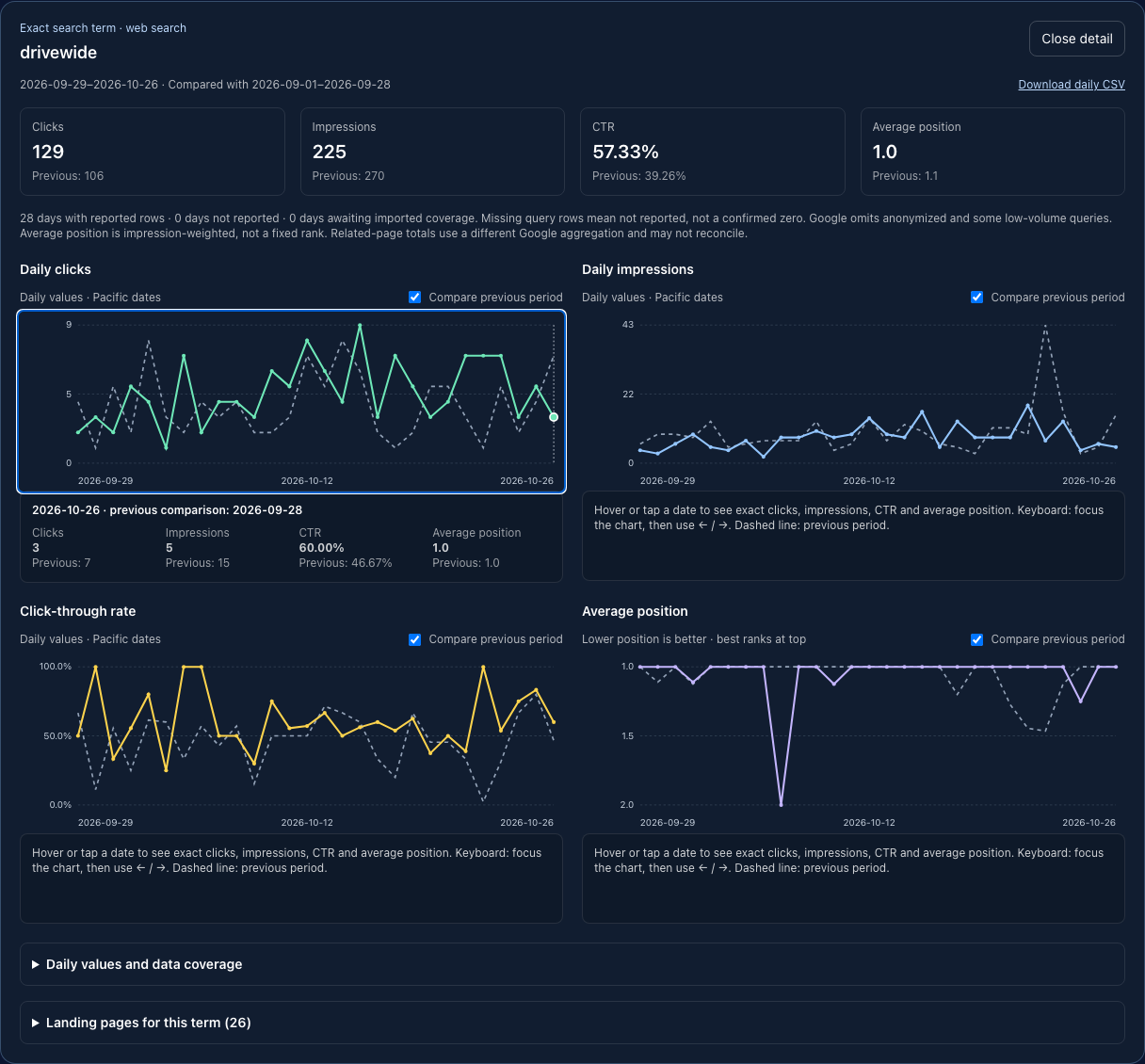
We added date and value axes, previous-period comparisons, and exact daily values on hover, tap, or keyboard navigation. Users can open an individual search term or landing page, inspect all four metrics, review related pages, and download daily values.
For example, our saved 28-day report for the exact term “drivewide” shows 129 clicks, compared with 106 in the preceding period. The detail view lets us inspect the days behind that change. Missing query rows stay labeled “not reported.” We do not turn them into invented zero-click days or rankings of zero.
7. Connect the evidence with practical SEO work#
Our reporting rules flag opportunities such as important pages with indexing concerns, pages losing clicks, and pages with substantial impressions but relatively weak CTR.
One example in our initial report was the buy-here-pay-here Daytona page: 5,142 impressions, 108 clicks, 2.10% CTR, and average position 6.3. That gives us a specific investigation. Review the actual searches, check whether the title and content match their intent, and consider accurate improvements to the listing, internal links, and relevant inventory presentation.
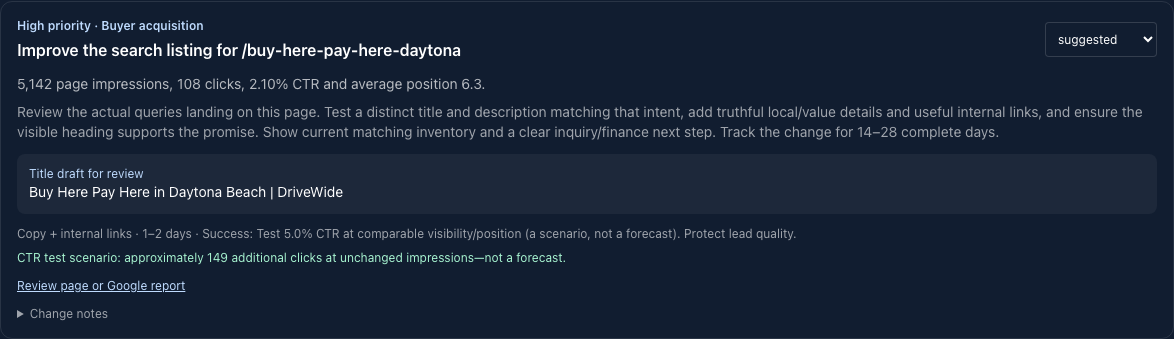
We record implemented changes and compare equal periods afterward. Inventory availability, seasonality, competition, and Google updates also affect performance. A before-and-after comparison helps assess a change without proving causation.
URL inspections add another piece of evidence: whether Google indexed a page and which canonical it selected. We inspect a rotating set of URLs and compare saved Google information with current website responses where useful. The inspection API describes Google’s indexed version; it does not perform a live indexability test or submit a page for indexing.
const res = await sc.urlInspection.index.inspect({
  requestBody: {
    inspectionUrl: "https://drivewide.com/buy-here-pay-here-daytona",
    siteUrl: "sc-domain:drivewide.com",
  },
});
const r = res.data.inspectionResult.indexStatusResult;
console.log(r.verdict, r.coverageState, r.googleCanonical, r.lastCrawlTime);
URL Inspection is limited to 2,000 queries per day per site (Google).
Common Search Console API errors#
Scroll to see full table
| Error | Likely cause | Fix |
|---|---|---|
redirect_uri_mismatch | Callback URL doesn't exactly match the registered redirect URI | Match protocol, host, path and trailing slash in Google Cloud > Credentials |
403 User does not have sufficient permission for site | Wrong siteUrl format, or the authorizing account lacks property access | Use sc-domain:example.com for domain properties or the exact URL-prefix property (https://example.com/), and confirm access in Search Console > Settings > Users |
invalid_grant on token refresh | Refresh token revoked, or the OAuth app is in "Testing" mode (tokens there expire) | Reconnect, and publish the OAuth consent screen for long-lived tokens |
429 / quota exceeded | Too many requests in a short window | Back off and retry, batch by date, and serve saved reports from your own database |
| Totals don't match query rows | Google withholds some query data | Use property totals for headline metrics and keep query rows separate (already explained in step 4) |
Where AI adds value#
AI helped us move from an integration idea to working software, supporting the authorization flow, import process, dashboard, and tests. The same technology can help dealers interpret information when it receives reliable context.
A useful analysis should include the selected date range, comparison period, underlying metrics, data-coverage limits, and relevant dealership facts. Current inventory and verified financing information matter when suggesting changes to a dealer website.
Review this page’s search performance and query-to-page data. Separate observations from possible explanations. Suggest three improvements supported by the evidence, identify what still needs verification, and explain how we should measure each change.
That is a more useful assignment than simply asking an AI tool to improve SEO. A future in-app AI analyst could summarize weekly changes, group related search intent, propose content briefs, and draft titles for review. Those language-model features would be an additional layer; the current reporting recommendations use defined rules.
AI-generated dealership content needs human review. Vehicle availability, prices, specifications, and financing statements must be checked against current facts. Google likewise advises reviewing generated content for accuracy and warns that producing many pages without adding value can violate its spam policies.
What about appearing in AI-generated search answers?#
Google says foundational SEO practices remain relevant to AI Overviews and AI Mode: accessible pages, useful original content, clear internal links, and accurate information. There are no special additional technical requirements for appearing in those features.
For DriveWide, that supports practical work: keeping inventory information current, answering real buyer and seller questions, and making important pages understandable and easy to find. We do not treat our Search Console integration as a complete tracker of AI mentions or citations across every platform.
Measure dealership outcomes alongside visibility#
The Intelligence Hub also shows separately measured first-party Google-organic visits, lead sessions, and credit-application sessions. We keep those observations distinct from Search Console clicks. Aggregate query data does not identify which individual shopper submitted an application.
Together, these reports help us evaluate whether increased visibility accompanies useful website activity. At launch, our target was to double impressions, clicks, and tracked Google-organic traffic by December 31, 2026. That is a measurable target with a recorded baseline, not a promised result.
For other dealers, the benefit is a repeatable process: collect reliable information, investigate a specific opportunity, make a useful change, and review what happens afterward. AI can help with development and analysis, while accurate data and dealership knowledge keep the work grounded.
FAQ#
Is the Google Search Console API free?
Yes. There is no charge to use it, but Google sets usage limits. Check the current limits at developers.google.com/webmaster-tools/limits.
Can I use an API key instead of OAuth?
No. Private Search Console data requires OAuth authorization from an account with access to the property.
How far back does Search Console API data go?
Performance data covers about 16 months, per Search Console. Import and store it if you want a longer history.
Why don’t my query rows add up to the site total?
Google withholds some queries, so detailed rows may not reconcile to property totals. Use property totals for headline numbers.
Can the Search Console API submit pages for indexing?
No. URL Inspection reports Google’s indexed version of a URL; it does not request indexing. Use a sitemap, or Request indexing in the Search Console interface.
Is the Search Console API the same as the Google Search API?
No. The Search Console API reports your own site’s search performance and index status. The Custom Search JSON API returned Google search results; it is closed to new customers and ends January 1, 2027. See the comparison above.