
Dialpad API Tutorial: Pull Call Logs and Put Calls on CRM Leads
How DriveWide lists concluded Dialpad calls, collapses office and user legs, and matches the outside number to a lead.
What the lead page needed#
A lead at DriveWide already had the website form, the texts, and the chat. The phone call that started the conversation was still only in Dialpad’s call history. Opening the lead should show that call next to the messages: incoming, outgoing, missed, or voicemail, who handled it, and how long they talked.
Dialpad’s call list was the right source. It is a read of calls that have already ended. We did not need to place calls through the API, and we did not need call recordings on the lead.
Use a company key, and keep it on the server#
A company admin creates the key in Dialpad under Admin Settings, My Company, Authentication, API Keys, and adds the calls:list scope. Dialpad shows the key once. We store it as DIALPAD_API_KEY on the server. The article and the code samples use that name only.
With no target filter, a company-level key lists the company’s calls. A user-level key lists that user’s calls, which would miss the rest of the store. Dialpad’s authentication guide allows the key as a query parameter and recommends against it, because the key then shows up in logs. We send it only as Authorization: Bearer.
List concluded calls, then follow the cursor#
Call — List returns calls that have already concluded, in reverse chronological order by start time. A call that is still ringing is absent until it ends. started_after and started_before are UTC milliseconds. Each response is { cursor, items }. Pass cursor back until it is empty.
Dialpad documents 20 requests per second per company (rate limits), and the call list reference lists 1,200 per minute. One request every 15 minutes is far below both. We leave include_anonymized at its default of false, so calls tied to deleted users stay out of the import.
const key = process.env.DIALPAD_API_KEY;

async function listCalls(startedAfter) {
  const calls = [];
  let cursor = "";
  do {
    const url = new URL("https://dialpad.com/api/v2/call");
    url.searchParams.set("started_after", String(startedAfter)); // UTC milliseconds
    if (cursor) url.searchParams.set("cursor", cursor);
    const response = await fetch(url, {
      headers: {
        Authorization: `Bearer ${key}`,
        Accept: "application/json",
      },
    });
    if (!response.ok) throw new Error(`Dialpad call list failed: ${response.status}`);
    const payload = await response.json(); // { cursor, items }
    calls.push(...(payload.items || []));
    cursor = typeof payload.cursor === "string" ? payload.cursor : "";
  } while (cursor);
  return calls;
}
curl -s "https://dialpad.com/api/v2/call?started_after=1761696000000" \
-H "Authorization: Bearer $DIALPAD_API_KEY" \
-H "Accept: application/json"import os, requests
def list_calls(started_after_ms):
calls, cursor = [], ""
while True:
params = {"started_after": str(started_after_ms)}
if cursor:
params["cursor"] = cursor
r = requests.get(
"https://dialpad.com/api/v2/call",
params=params,
headers={"Authorization": f"Bearer {os.environ['DIALPAD_API_KEY']}",
"Accept": "application/json"},
timeout=30,
)
r.raise_for_status()
payload = r.json() # { cursor, items }
calls.extend(payload.get("items") or [])
cursor = payload.get("cursor") if isinstance(payload.get("cursor"), str) else ""
if not cursor:
return callsPolling the call list vs. Dialpad webhooks#
Dialpad can also push call events to a webhook. You create a webhook, then a call event subscription for the company, an office, or a narrower target such as a user or call center (Dialpad Call Events). Events arrive as each call changes state (for example ringing, connected, hangup), may arrive out of order, and are signed as a JWT with a secret you share with Dialpad (Dialpad Event Subscriptions). Subscriptions are created with POST https://dialpad.com/api/v2/subscriptions/call (Dialpad reference).
We chose polling for the lead timeline because the call list returns finished calls only, re-reading three days catches leads created after the call, and the same code runs the history backfill. Webhooks fit better when you need something to happen the moment a call ends, such as a missed-call alert to a salesperson.
Scroll to see full table
| Call list (polling) | Call event webhooks | |
|---|---|---|
| Timing | Every run, after the call ends | Each state change, close to real time |
| Setup | API key, one scheduled job | Public HTTPS endpoint, webhook, subscription, JWT verification |
| History backfill | Yes | No, only new events |
| Best for | Timelines, reporting, CRM history | Missed-call alerts, live dashboards |
Turn several legs into one conversation#
One inbound call can come back as several rows. On a real DriveWide call, Dialpad returned the office line, the user who answered, and another user who did not pick up. master_call_id was empty on all three. The office row’s call_id was the other rows’ entry_point_call_id. Grouping on master_call_id alone would have saved three calls.
The conversation id is entry_point_call_id, then master_call_id, then call_id. When a group has a user leg whose duration is at least 1,000 milliseconds, we keep that leg. If two users both connected, the longer duration wins. The saved start time is the earliest start in the group. Voicemail, recorded, and transferred flags are true if any leg set them.
Dialpad documents duration as the call length in milliseconds, and total_duration as that length including ring time. We store duration. Ring time is not talk time on the timeline.
function conversationId(call) {
  return String(call.entry_point_call_id || call.master_call_id || call.call_id);
}

function connectedUser(call) {
  return call.target?.type === "user" && Number(call.duration) >= 1000;
}

function hasVoicemail(call) {
  return Boolean(call.voicemail || call.voicemail_link || call.voicemail_recording_id);
}

function normalize(call) {
  return {
    ...call,
    date_started: Number(call.date_started),
    duration: Number(call.duration) || 0,
    was_recorded: Boolean(call.was_recorded),
    is_transferred: Boolean(call.is_transferred),
    voicemail: hasVoicemail(call),
  };
}

// One customer conversation can arrive as an office leg plus one or more user legs.
function collapse(calls) {
  const grouped = new Map();
  for (const raw of calls) {
    const call = normalize(raw);
    const id = conversationId(call);
    const current = grouped.get(id);
    if (!current) {
      grouped.set(id, call);
      continue;
    }
    const chosen =
      [current, call].filter(connectedUser).sort((a, b) => b.duration - a.duration)[0] ||
      (call.duration > current.duration ? call : current);
    grouped.set(id, {
      ...chosen,
      date_started: Math.min(current.date_started, call.date_started),
      was_recorded: current.was_recorded || call.was_recorded,
      is_transferred: current.is_transferred || call.is_transferred,
      voicemail: current.voicemail || call.voicemail,
    });
  }
  return [...grouped.values()];
}
Match the outside number to the lead#
The customer number is external_number, or contact.phone when the first field is missing. We strip everything that is not a digit. An 11-digit value that starts with 1 loses that leading 1. What remains has to be a 10-digit US number, first digit 2–9. anonymous and other blocked values fail that check and are not stored.
Lead phone numbers go through the same function, so (386) 555-0142, +1 386-555-0142, and 3865550142 are one key. A number shared by two leads is attached to both. Each import deletes that conversation’s lead links and writes them again, so a corrected lead phone is picked up the next time that call is read.
function nationalDigits(phone) {
  const digits = String(phone || "").replace(/\D/g, "");
  const national = digits.length === 11 && digits.startsWith("1") ? digits.slice(1) : digits;
  return /^[2-9]\d{9}$/.test(national) ? national : "";
}

// "(386) 555-0142", "+1 386-555-0142", and "3865550142" all become "3865550142".
// "anonymous" and other blocked values become "".
What we store, and what we leave in Dialpad#
The lead page does not call Dialpad. It reads two tables: one row per conversation, and a link from that conversation to each matching lead. Opening a lead never needs the API key.
Scroll to see full table
| Dialpad field | What we keep |
|---|---|
entry_point_call_id, master_call_id, call_id | One conversation id, and the call id of the leg we kept |
date_started, then rang, connected, or ended | The earliest start in the conversation, as a timestamp |
direction | inbound or outbound |
duration | Milliseconds. We do not store total_duration |
state | The state string, capped at 40 characters. The timeline does not show this raw value |
external_number or contact.phone | The 10-digit national number, used only for matching |
target.name and target.type | A short name, and whether the target was a user. Names that contain an email, a URL, or seven or more digits are dropped |
Voicemail, was_recorded, is_transferred | Three booleans. The URL and the recording id are not saved |
Recording share links, screen recordings, voicemail URLs, transcription text, the internal number, contact email, and the target’s phone number are left in the API response. The timeline text is checked so a phone number cannot slip into the name or the label.
How one call reads on the lead#
Talk time of at least one second counts as a connected call. Anything shorter is a miss, unless a voicemail was left. Two calls with the same label both stay on the timeline. Text messages with the same body are collapsed. Calls are not.
Scroll to see full table
| Call | Label | Detail |
|---|---|---|
| Voicemail | Voicemail | Left for the staff name, when we have one |
| Inbound, at least 1 second | Incoming call | Answered by the staff name, plus the talk time |
| Inbound, under 1 second | Missed call | No answer |
| Outbound, at least 1 second | Outgoing call | The staff name called, plus the talk time |
| Outbound, under 1 second | Outgoing call | No answer |
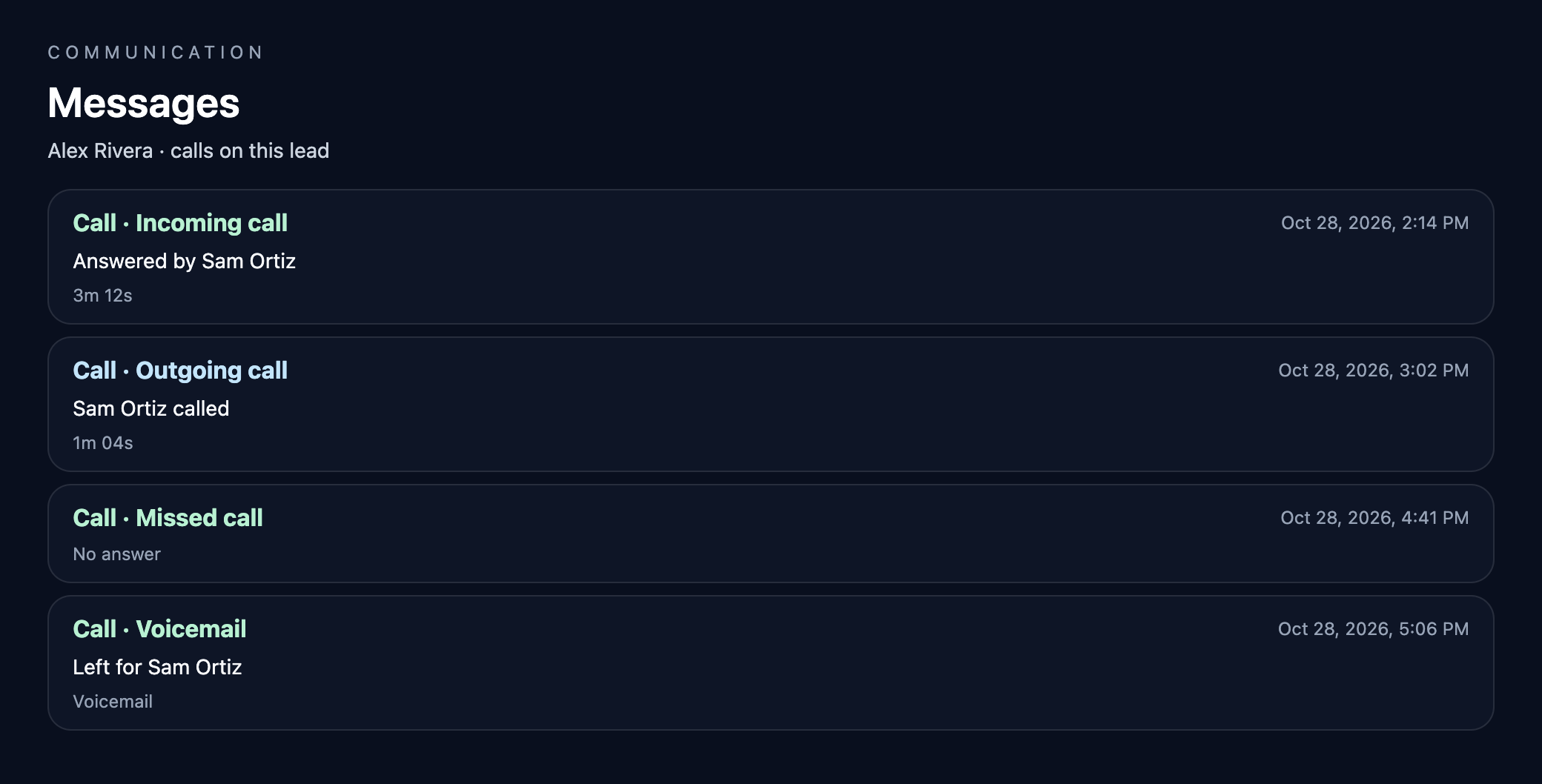
The lead query returns at most 100 calls, oldest first. The phone number is not one of the columns that query reads.
Refresh every 15 minutes, and backfill once#
A scheduled job calls GET /api/cron/dialpad-calls with Authorization: Bearer and a separate cron secret. The regular run reads the last three days and stops after 15 pages. Because those three days are read again each time, a lead created today is linked to calls from that window on the next run. Calls older than three days stay as they were linked.
The first history load is a separate backfill. It clears the two call tables, then walks backward from the later of two dates: one day before the oldest lead that has a phone number, or 400 days ago. It takes up to 25 passes of 40 pages, setting started_before to just before the oldest call in the previous pass. That flag is destructive. The 15-minute job is not.
That first backfill reported 30 pages and 728 call records. After collapsing legs and dropping numbers that were not a 10-digit US number, it stored 414 conversations and wrote 142 links from those conversations to leads. Its start bound was 2025-09-24. Calls before that bound were not imported.
Scroll to see full table
| First backfill | Result |
|---|---|
| Pages read | 30 |
| Call records returned | 728 |
| Conversations after collapsing legs | 414 |
| Links written to leads | 142 |
| Start bound | 2025-09-24 |
Mistakes that double-count a call#
Scroll to see full table
| What you see | Why | What we do |
|---|---|---|
| Three timeline rows for one ring | master_call_id is empty, so each leg looks new | Group on entry_point_call_id first |
| Talk time includes the ring | total_duration includes ring time | Store duration |
| The same number misses the lead | The lead is stored as 10 digits and the call as 11 | Compare the 10-digit national number |
| A recording URL lands on the lead | The list response includes share links and transcription text | Keep a boolean, and drop the URL |
| Two missed calls become one | The text-message deduper treats identical bodies as the same message | Skip that deduper for calls |
Why calls belong on the lead#
Phone calls are often the first contact on a used-car lead, and they used to live only in Dialpad. With calls on the lead, a salesperson opening a credit application or web lead sees whether the customer already called, who answered, and whether the call was missed. Missed calls become a visible follow-up instead of a forgotten notification.
FAQ#
Does the Dialpad call list include calls that are still ringing?
No. Call — List returns only calls that have already concluded, newest first.
Can a user API key list every call in the company?
No. With no target filter, a company-level key lists the company’s calls. A user-level key lists that user’s own calls.
Why does one phone call come back as several API rows?
Dialpad records a separate leg for the office or department and for each user the call rang. We group those rows by entry_point_call_id, then master_call_id, then call_id, and keep the connected user leg.
Do you store recordings or show the customer’s phone number on the timeline?
No. We store whether a voicemail or recording exists. The timeline shows the call type, who handled it, and how long they talked. Phone numbers, recording URLs, and transcripts stay off the timeline.
How soon does a new call show up on the lead?
A scheduled job runs every 15 minutes and re-reads the last three days. A call appears after it has concluded and the next run imports it.
What if two leads share a phone number?
The call is attached to every lead with that number. A number that is anonymous, blocked, or not a 10-digit US number is not stored.
Does Dialpad have webhooks for calls?
Yes. Create a webhook, then a call event subscription. Events are sent as calls change state and are JWT-signed with a shared secret. See polling versus webhooks.
What scope does the Dialpad call list need?
calls:list, on a company-level API key if you want every call in the company.
Is Dialpad call duration in seconds or milliseconds?
Milliseconds. duration is the call length, and total_duration includes ring time.